Skip to content
Point of sale for Android, web and computer

The POS app that runsyour whole shop.

BytePOS runs your whole shop in one app: billing, stock, customer credit, suppliers, expenses and profit. On your phone, in the browser and on your computer, even without internet.
  • Works without internet
  • 6 languages
  • PKR and 24 more currencies
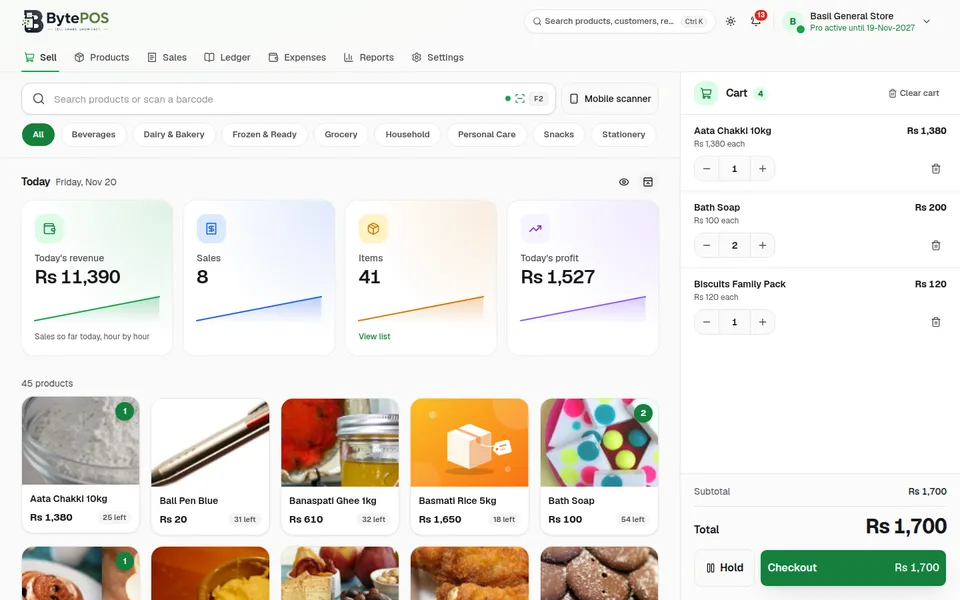
BytePOS Web POS Sell screen: product grid by category, today's sales cards and the cart with total and Checkout
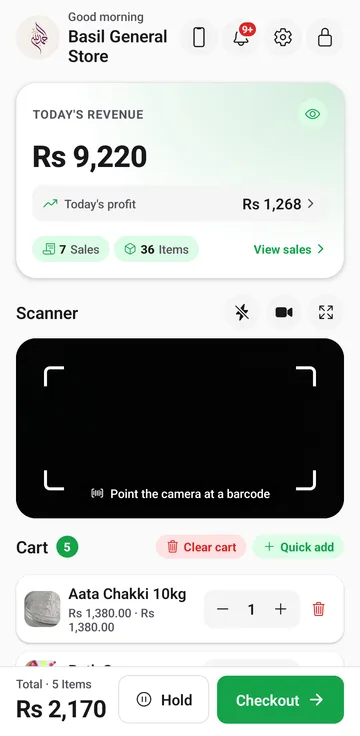
BytePOS Android app home screen: today's revenue, barcode scanner and the cart
  • Android appon Google Play

  • Web POSin any modern browser

  • Computer appfor Windows and Linux

  • One shopsynced on every device

Product tour

The real BytePOS, on phone and browser

Every screen below is taken from the BytePOS app and Web POS as they are today.

Billing

Bill in seconds

Scan a barcode or tap a product, take cash, card or a credit (udhaar) sale, add a discount and print or share the receipt.
  • Hold a cart and serve the next customer
  • Tax per product, change worked out for you
  • Returns and refunds from any past sale
Web POS Sell screen with product photos, categories and the cart
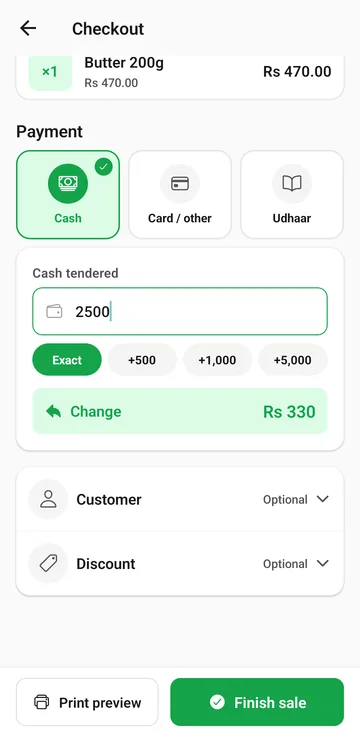
Android checkout: cash, card or udhaar, cash tendered and change

Products & stock

Know what's on the shelf

Products with photos, barcodes, categories, purchase and selling price. Stock goes down with every sale and up when you restock.
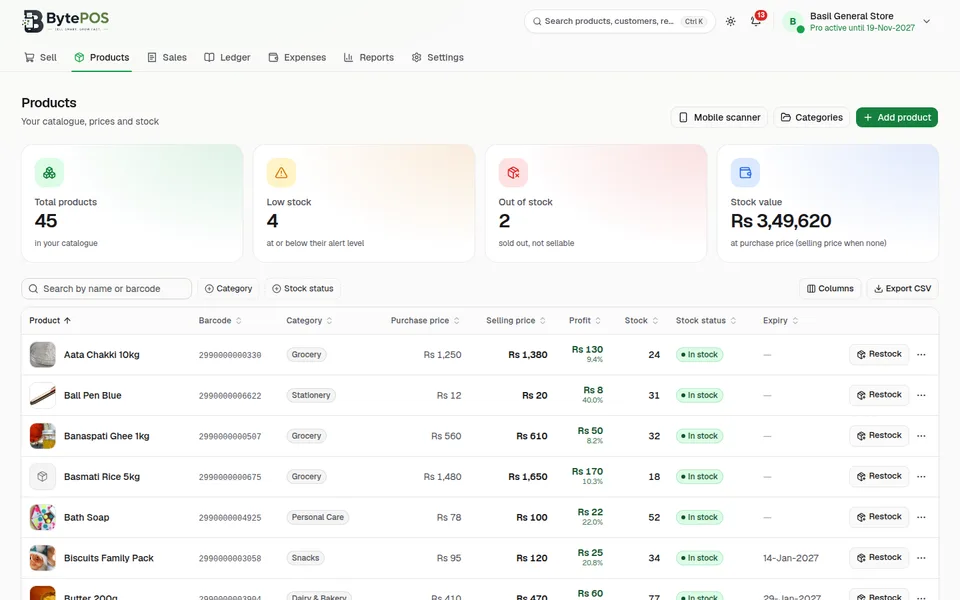
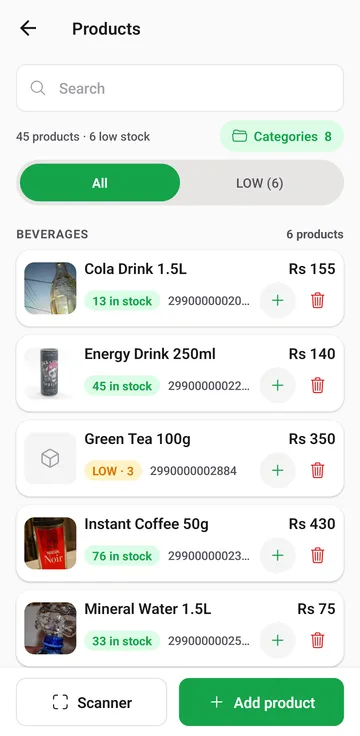
  • Low-stock and out-of-stock alerts
  • Expiry dates with reminders before they pass
  • Profit per product from the purchase price
Web POS Products page: totals, low stock, stock value and the product table
Android Products list with stock per item and a restock button

Customers & ledger

A credit book that adds itself up

Keep customers and suppliers in one ledger. Every credit sale is recorded on the customer's account, with the balance always correct.
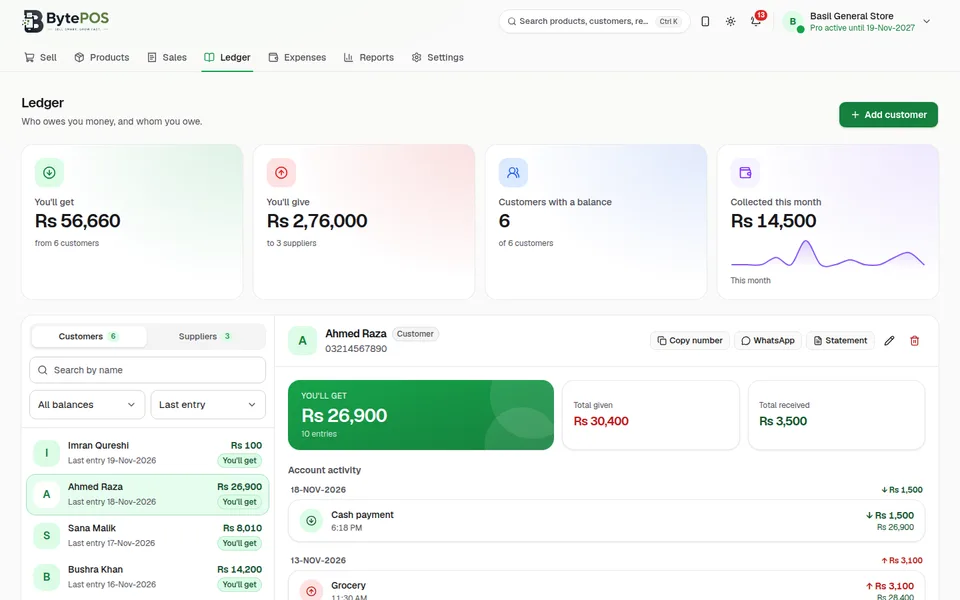
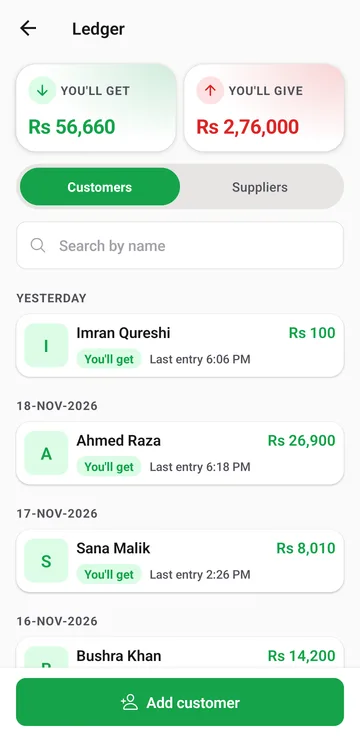
  • "You'll get" and "you'll give" totals at a glance
  • WhatsApp reminders and account statements
  • Bill photos attached to entries
Web POS Ledger: customer list and one customer's account activity
Android Ledger with customers, balances and you'll get / you'll give totals

Reports

See how the shop is doing

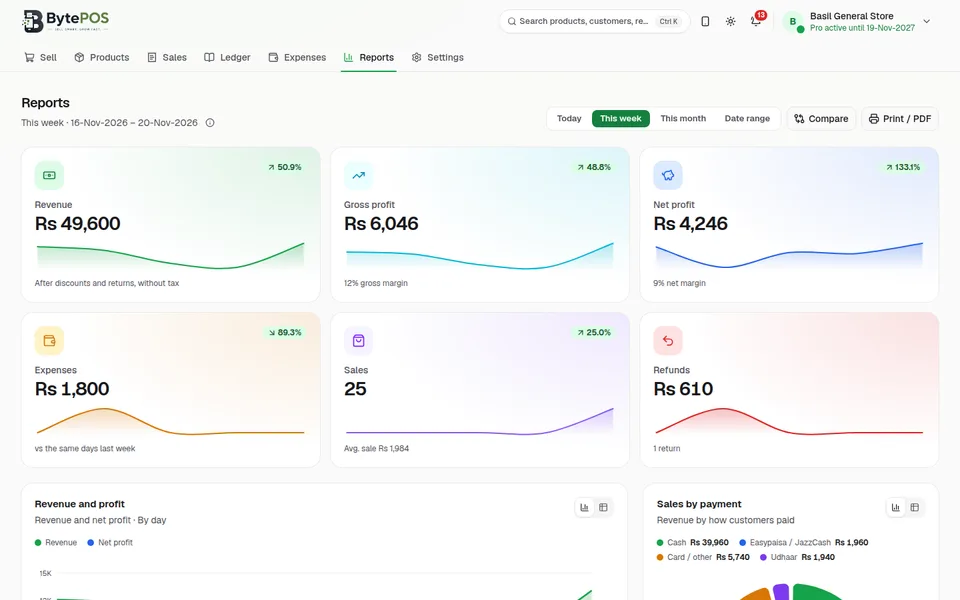
Revenue, gross and net profit, expenses and refunds for today, this week, this month or any range you pick.
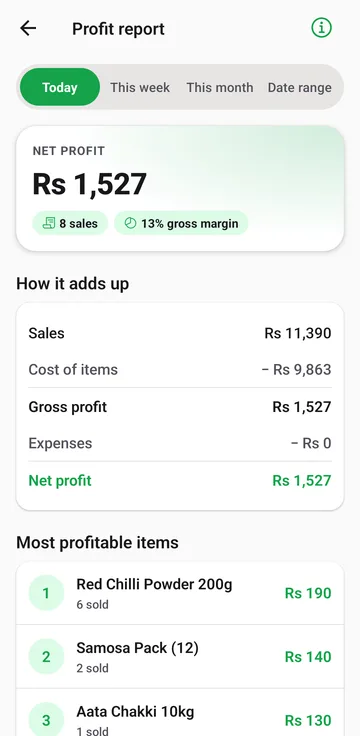
  • Most profitable items
  • Sales by payment method
  • Charts for every period on the Web POS
Web POS Reports: revenue, gross profit, net profit and charts
Android profit report: net profit, how it adds up and most profitable items

Sales & expenses

Every sale and every expense

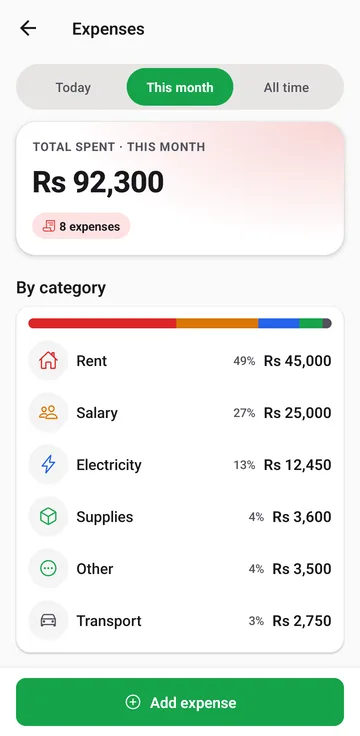
Search the full sales history by receipt or item, and record rent, salaries, bills and supplies so the profit report is complete.
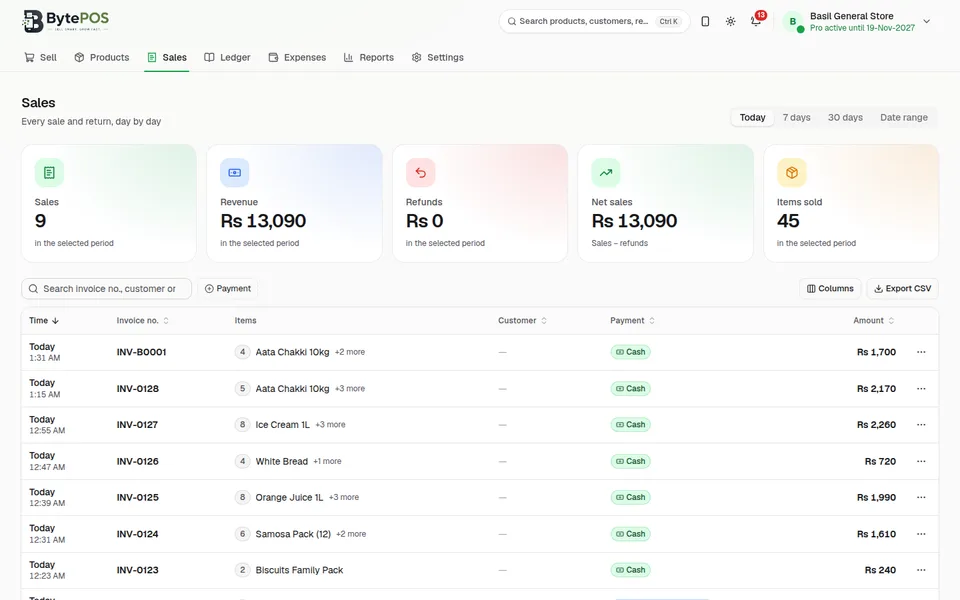
  • Day-by-day sales with refunds shown
  • Expenses by category, with your own categories
  • Export the sales list as CSV on the web
Web POS Sales: sales, revenue, refunds and the list of invoices
Android Expenses: total spent this month and spending by category

Features

Everything a shop needs, nothing it doesn't

Built for the counter: quick to learn, fast to use, and complete enough to run the whole shop.

Point of sale & billing

Cash, card and credit sales, discounts, tax per product, held carts and printed or shared receipts.

Products

Products with photos, barcodes, categories, purchase and selling price, tax and expiry date.

Inventory

Live stock on every sale, quick restock, low-stock and expiry alerts, and the value of your stock.

Customers

A credit (udhaar) account for each customer, with reminders on WhatsApp and statements as PDF.

Suppliers

Track what you owe each supplier: goods taken on credit and every payment you make.

Ledger

Entries with date, details and bill photos. Balances are always worked out from the entries, never typed.

Expenses

Rent, salaries, electricity and your own categories, by period, with a breakdown of where money goes.

Business reports

Profit report, sales history, top items and payment methods for any period.

Barcode support

Scan with the phone camera or a USB scanner, or use your phone as a wireless scanner for the Web POS.

Staff and roles

Invite staff by email with roles such as Cashier, Manager or Inventory. Each sale shows who made it.

Mobile and web sync

One shop account on your phones, browsers and computers, kept in step automatically when online.

Offline, with backups

Everything works without internet. Back up to the phone and to your own Google Drive.

Make it yours

Your team, your rules, your counter

Give every person the right access, and set up BytePOS the way your shop works.

Pro

Role-based staff access

Invite staff by email. Each person signs in with their own email and password and sees only what their role allows, on the phone, the Web POS and the computer.

  • Start from a ready-made role, or give one person their own permissions
  • 28 permission switches, from discounts and credit sales to purchase prices and reports
  • Shop settings, backups, passwords and staff stay with the owner only
  • Switch someone off or remove them at any time; their sales history is kept
  • Works offline: staff can sign in and sell without internet
C

Cashier

Sells at the counter: cart, checkout, receipts and returns

M

Manager

Runs the shop day to day: sales, products, stock, customers and expenses

I

Inventory manager

Looks after products, categories and stock

Y

Your own roles

Create as many as you need, with a name, a description and their own switches

Owner-only settings are never a switch, so no role can get them.

Pro

Your theme colour

Pick the app’s colour from 10 choices, from Emerald Garden to Urban Graphite.

Pro

Several shops

Run more than one shop from the same phone or browser, each with its own data.

A Home screen that fits

Choose the cards on Home: today's revenue, the scanner, the ledger or expenses.

Alerts that matter

Low stock, out of stock, expiring products and backups due, in one place.

Hold carts

Park up to 10 carts and pick them up again with today’s prices and stock.

Invite & earn

Invite other shops with your code and earn free months of Pro.

How it works
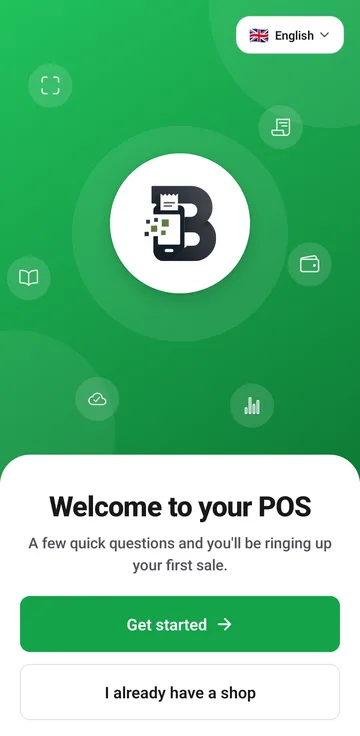
From download to first sale in minutes

  1. BytePOS welcome screen: Welcome to your POS, Get started
    1

    Create your shop

    Install the app, enter your shop's name and email, and set a password.
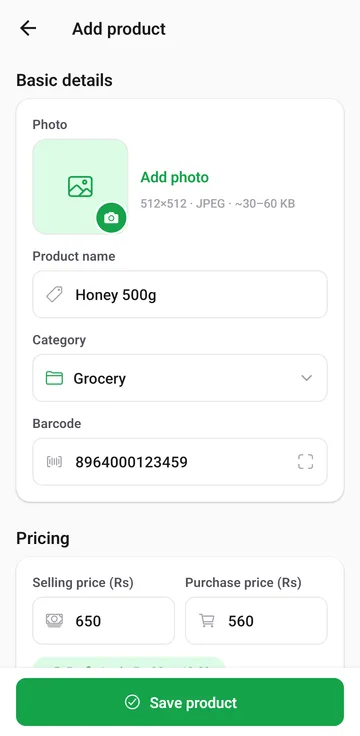
  2. Add product form with photo, name, category, barcode and prices
    2

    Add products and stock

    Scan a barcode, add a photo, set the prices and how many you have.
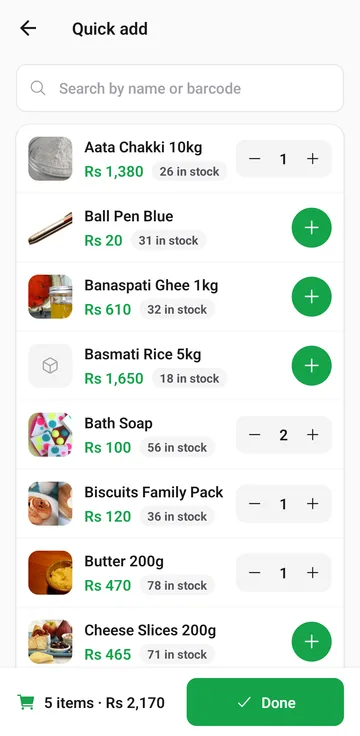
  3. Quick add: search products and add them to the cart
    3

    Start selling

    Scan or search, check out and give a receipt. Stock updates by itself.
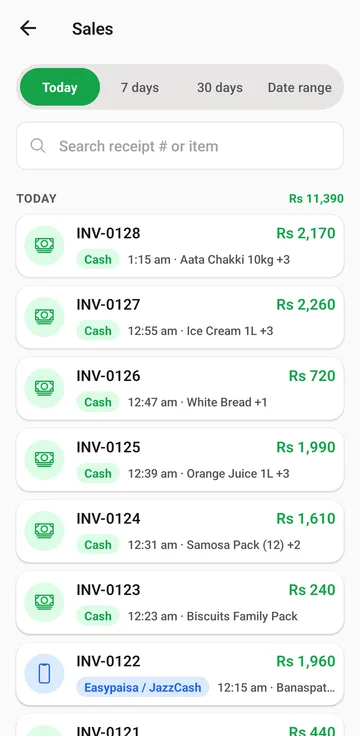
  4. Sales history grouped by day with totals
    4

    Track your performance

    See today's sales, profit, expenses and what sells best.

Web POS · BytePOS Pro

Your shop on the big screen

Open the same shop in your browser or on your computer, and bill, check stock and read your reports on a full-size screen.

  • The same shop as your phone: products, sales, ledger and reports stay in sync
  • Big-screen billing with a USB barcode scanner, or your phone as the scanner
  • Reports, sales and products as searchable tables with CSV export
  • Keeps working offline; changes sync when you're back online
  • Also as a computer app for Windows and Linux

Sign in with your shop's email and password, or set up a new shop right there. The Web POS and the computer app are included with BytePOS Pro.

Web POS Reports page with revenue, profit and expense charts

Android app

Your shop goes wherever you go

Bill at the counter, check stock in the storeroom and read the numbers at home, all from your phone.

Home: today's revenue, scanner and cart

Dashboard

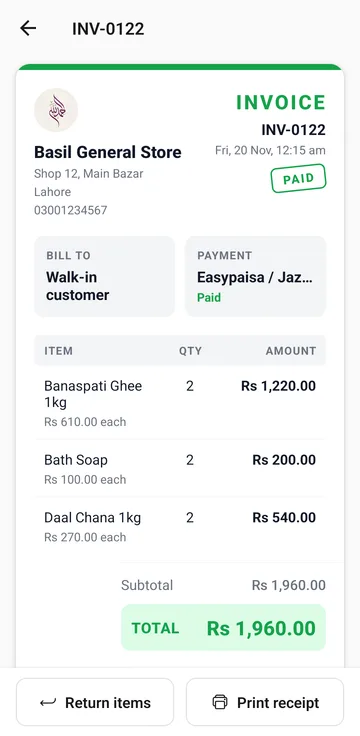
An invoice with items, payment and total

Sales & billing

Products with stock levels

Products & stock

Profit report for today

Reports

Get it onGoogle Play

For Android phones. On an iPhone or iPad, use the Web POS in Safari.

Why BytePOS

Made for the way small shops work

Faster billing

Scan, tap and check out. A held cart lets you serve the next customer without losing the first.

Better stock visibility

Stock moves with every sale, return and restock, and alerts tell you before you run out.

Organized records

Sales, credit, supplier dues and expenses in one place instead of registers and slips.

No internet? No problem

Billing never waits for a connection. Your data lives on your device first.

Mobile and web access

Sell from the phone at the counter and check the numbers on a big screen.

Clear performance

Know your real profit after cost, returns and expenses, not just your sales.

Locked with your password

The app opens with your shop password or fingerprint and locks itself when left in the background.

You decide who sees what

Staff only see the screens their role allows. Owner settings stay with the owner.

Backups you own

Copies on your phone and in your own Google Drive, restorable at any time. Privacy policy

Video tutorials

Short videos that show how to use BytePOS

Short videos for every part of BytePOS. Watch, then try it yourself.

Pricing

Start free. Go Pro when you're ready.

The free app runs your shop. Pro adds printing, PDFs, staff, the Web POS and more.

Free

Everything to run your shop

Rs 0Free forever

  • Up to 50 products
  • Billing, barcode scanner and stock
  • Customers and suppliers (ledger)
  • Expenses and categories
  • Backup to the phone and Google Drive
  • Receipts on screen
  • Sales of the last 30 days
Everything unlocked

BytePOS Pro

Everything in Free, plus

Rs 300per month

  • Unlimited products
  • Several shops
  • Printer & printing
  • Receipt PDF & WhatsApp
  • No BytePOS branding
  • No ads
  • Full sales history
  • Notification history
  • Voice typing
  • Statement PDF
  • Statement for any period
  • Nightly automatic backup
  • Profit report
  • Theme color
  • Staff accounts
  • Web and computer

Get Pro in the app: Settings → BytePOS Pro. The Web POS and the computer app are part of Pro.

FAQ

Questions shop owners ask

Contact

Yes. Billing, stock, the ledger, expenses and reports all work offline, on the phone and on the Web POS. Internet is only needed to sync between devices, back up to Google Drive and confirm your email.

Android phones (from Google Play), any modern browser through the Web POS, and a computer app for Windows and Linux. There is no iPhone app; on an iPhone or iPad you can use the Web POS in Safari.

Download BytePOS from Google Play and set up your shop on the phone. With Pro, sign in to the Web POS with the same email and password.

The Web POS and the computer app are part of BytePOS Pro. Sign in with your shop's email and password at bytepos.vercel.app/app.

In the app, open Settings → BytePOS Pro. The free app keeps working while you decide.

Yes. The phone camera scans barcodes, the Web POS works with USB barcode scanners, and a phone in your shop can act as a wireless scanner for the Web POS.

Every sale has a receipt on screen. With Pro you can print it on a printer your phone or computer can print to, or share it as a PDF on WhatsApp.

English, Urdu, Roman Urdu, Arabic, Pashto and Hindi. Pakistani rupee by default, with about 25 currencies to choose from.

With Pro, invite staff by email. Each one signs in with their own password and gets a role, such as Cashier, Manager or Inventory, that decides what they can see and do.

Once your shop account is set up, your data is kept on our server and comes back when you sign in on another phone. You can also restore from a backup on your phone or Google Drive.

Ready to run your shop with BytePOS?

Start free on your Android phone. Open the same shop in your browser with Pro.

Scan this QR code with your phone camera to open BytePOS on Google Play

Scan to get the app

Get it onGoogle Play